Redirects: send old links to a new page
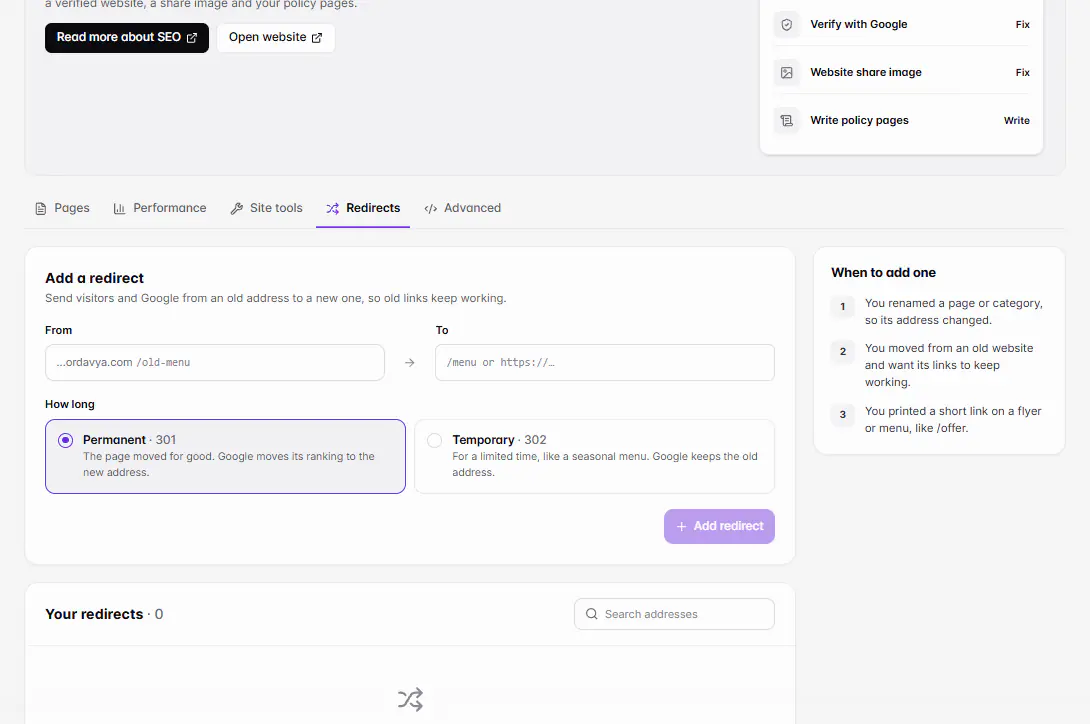
In Marketing › SEO › Redirects, choose Add redirect, enter the old address under From (like /old-menu) and where it should go under To, and pick Permanent or Temporary. It works on your website right away.
Actualizado el 20 de noviembre de 2026Dónde encontrarlo
- Marketing
- SEO
- Redirects
- Control Center
- SEO
Necesitas: A website project. The owner, or staff with SEO access. Up to 500 redirects per website.
A redirect sends visitors and Google from an old address to a new one, so old links keep working. You don't need one when you change a page's URL slug or your ordavya.com address: Ordavya forwards those by itself.
When to add one
- You moved from an old website and want its links to keep working.
- You printed a short link on a flyer or menu, like /offer.
- You renamed a page or category, so its address changed.
Add a redirect
- 1Open RedirectsGo to Marketing › SEO and choose the Redirects tab. In the Ordavya Admin app, go to Control Center › SEO and open Redirects.
- 2Choose Add redirectUnder From, enter the old address as a path on your website, like /old-menu.
- 3Enter where it goesUnder To, enter a page on your website (/menu) or a full link (https://…).
- 4Choose the type301 · Permanent: the page moved for good, and Google moves its ranking to the new address. 302 · Temporary: for a limited time, like a seasonal menu; Google keeps the old address.
- 5SaveYou see Redirect added. It works on your website now. Test it by opening the old address in a private window.
Find or remove redirects
Your redirects are listed under Your redirects. Use Search redirects to find one, and the remove button to delete it. A removed redirect stops working right away.
Si algo sale mal
Los mensajes que podrías ver y qué hacer.
The home page can't be redirected.
Choose another old address. To move visitors to a new website, change your domain instead.
An address can't redirect to itself.
Make To a different page from From.
There's already a redirect for that address.
Find it with Search redirects and remove it first, or keep the existing one.
The old address is a path on your website, like /old-menu (no spaces, ? or #).
Enter only the part after your domain, starting with /.
Send it to a page on your website (/menu) or a full link (https://…).
Start To with / for your own pages, or with https:// for another website.
A website can have up to 500 redirects.
Remove redirects you no longer need before adding more.