What happens when you reach a plan limit
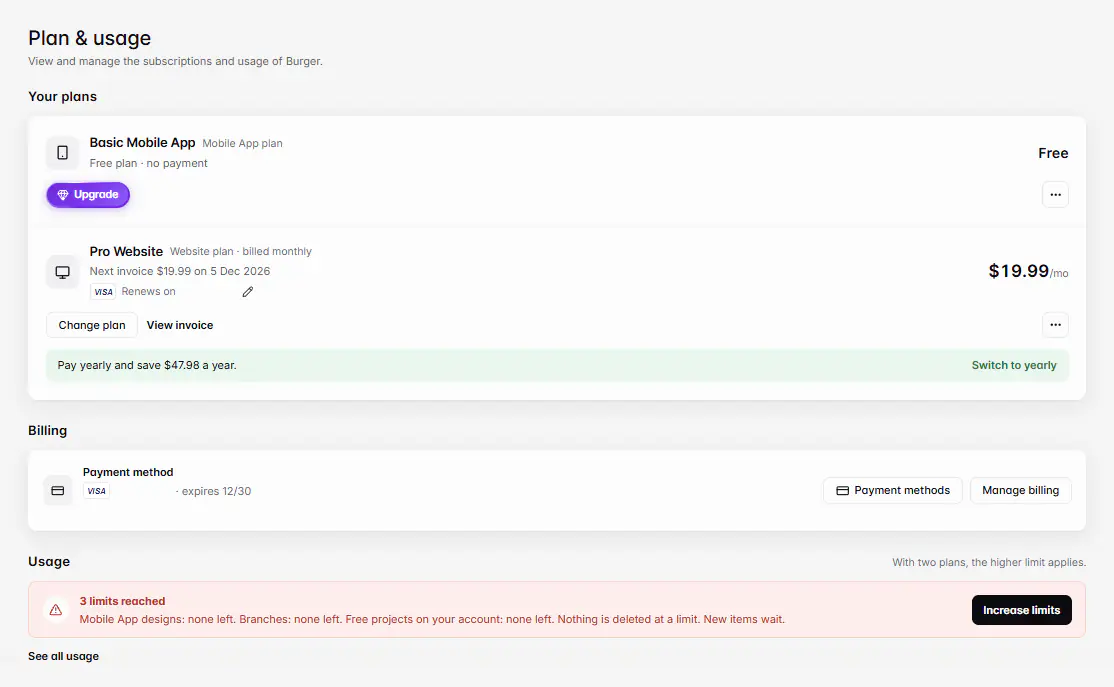
Nothing is deleted at a limit. New items wait: you can't add more designs, products, branches, staff or domains until you free space or upgrade. Settings › Plan & usage shows each limit and how much you use.
Mis à jour le 20 novembre 2026Où le trouver
- Settings
- Plan & usage
- Control Center
- Plan & usage
Il vous faut: The store owner sees Plan & usage. Upgrading is on the web dashboard.
Each plan has limits on how many things you can have. When you reach one, everything you already have keeps working: your website, app, menu and orders aren't touched. Only adding more of that thing is blocked.
Check your usage
Open Settings › Plan & usage. Under Usage, a bar shows each limit, such as {limit}: {left} of {max} left. A banner warns when {n} limits are getting close or {n} limits reached. In the Ordavya Admin app, see Control Center › Plan & usage.
The limits
| Limit | Comes from |
|---|---|
| Website designs, Website pages, Custom domains | Your Website plan. |
| Mobile App designs, Push notifications this month | Your Mobile App plan. |
| Media storage, Branches, Staff members, Products | The higher of your two plans. |
| Avya AI credits | Both plans added together, reset monthly. |
| Free projects on your account | Your account. Projects on a paid plan don't count. |
Owners don't count as staff members. Extra AI credits from Ordavya don't expire and are used after the month's credits.
What to do at a limit
- Free space: delete an archived design, remove unused media, or remove a staff member you no longer need.
- Wait for the reset: push notifications and AI credits start again each month.
- Get more: choose Increase limits or Get more {limit}, then upgrade. See Upgrade, downgrade or cancel a plan.
En cas de problème
Les messages que vous pourriez voir, et quoi faire.
You've reached your {limit} limit ({used} of {max}).
Remove something you don't need, or upgrade your plan.
You've used all your designs. Delete an archived design or upgrade your plan.
Delete a design you no longer use, or upgrade.
You've reached your branch limit. Upgrade your plan to add more branches.
Upgrade, or turn off a branch you no longer use.
You've used all your free projects. Upgrade one of your projects to a paid plan to create another.
Move an unused project to the trash or upgrade one. See Free projects and project limits.
Your website plan doesn't include a custom domain. Upgrade your plan to connect one.
Upgrade your Website plan to connect a domain.
You have used this month's AI credits.
Wait for next month's credits, or upgrade for more.