Cash on delivery and pay at pickup
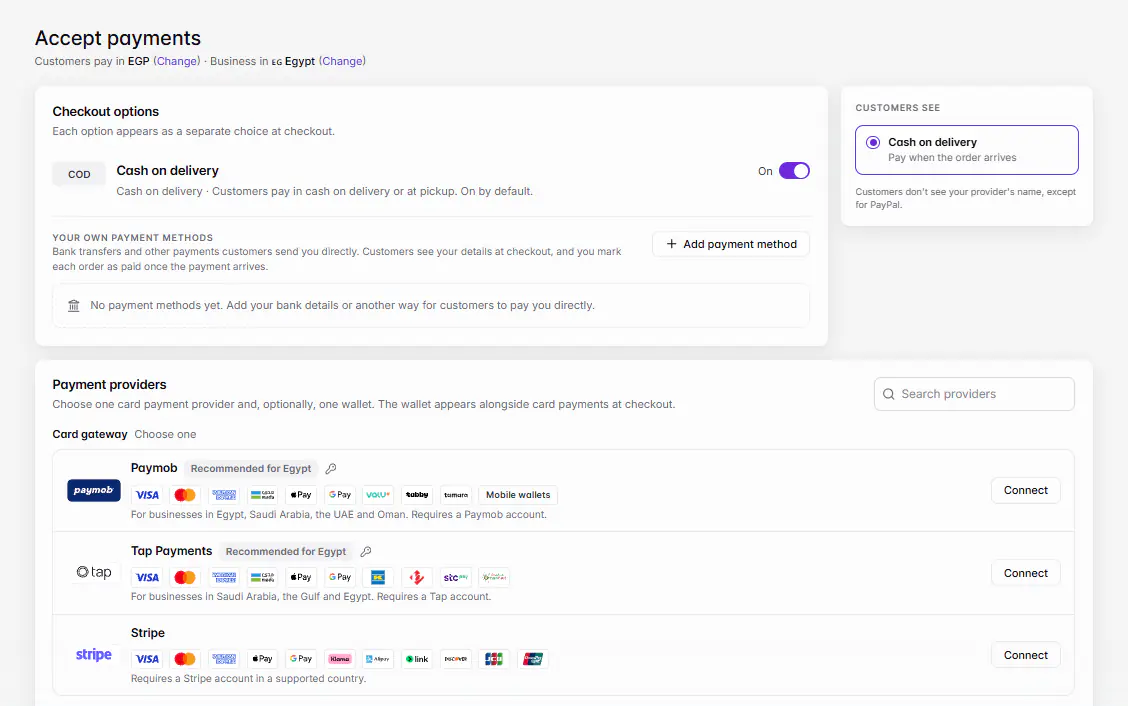
Cash on delivery is on by default. Customers pay when the order arrives, or at the store for pickup orders. To change it, open Settings › Accept payments and switch Cash on delivery On or Off under Checkout options.
Mis à jour le 20 novembre 2026Où le trouver
- Settings
- Accept payments
- Control Center
- Accept payments
- Cart
- Checkout
Il vous faut: Owner, or a staff member the owner gave Accept payments to.
Cash on delivery works in every country and currency, and you don't need a payment provider for it. A new store has it on until you turn it off; Accept payments shows Customers pay in cash on delivery or at pickup. On by default.
Turn cash on or off
- 1Open Accept paymentsOn the web, go to Settings › Accept payments. In the Ordavya Admin app, go to Control Center › Accept payments.
- 2Find Cash on deliveryUnder Checkout options, find Cash on delivery.
- 3Switch itSwitch it On or Off.
- 4Confirm it's youEnter your password or the emailed code. You see Cash on delivery is on. or Cash on delivery is off.
- 5Check the previewThe Customers see box shows the choices your customers now have at checkout.
What customers see
| Order type | Choice at checkout |
|---|---|
| Delivery | Cash on delivery · Pay with cash when your order arrives |
| Pickup | Pay at store · Pay with cash when you pick up |
A cash order goes straight to New on your Orders board, with the new-order sound. It doesn't wait for payment like an online order.
Other places cash appears
- Phone and counter orders that you add yourself are cash orders. See Add a phone or counter order.
- Convert to cash: if a customer can't finish paying online, staff can open the order under Orders › Awaiting payment and choose Convert to cash. It moves to New as a cash order.
- When an order is below your provider's online minimum, checkout shows Online payment from {amount} and falls back to cash if it's on.
- The Payments page counts Cash orders for the period next to your online totals.
En cas de problème
Les messages que vous pourriez voir, et quoi faire.
Customers can't pay yet. Turn on cash on delivery or connect a payment provider.
Every checkout option is off. Switch Cash on delivery back on, or connect a payment provider.
This store isn't taking payments right now.
Customers see this when no payment option is on. Turn on cash or another option.
Questions fréquentes
Can I offer cash for pickup but not delivery?
No. One switch covers both cash on delivery and paying at the store for pickup.
Who marks a cash order as paid?
Staff who can complete orders record it when they finish the order. See Accept, prepare and complete an order.