Redirects: send old links to a new page
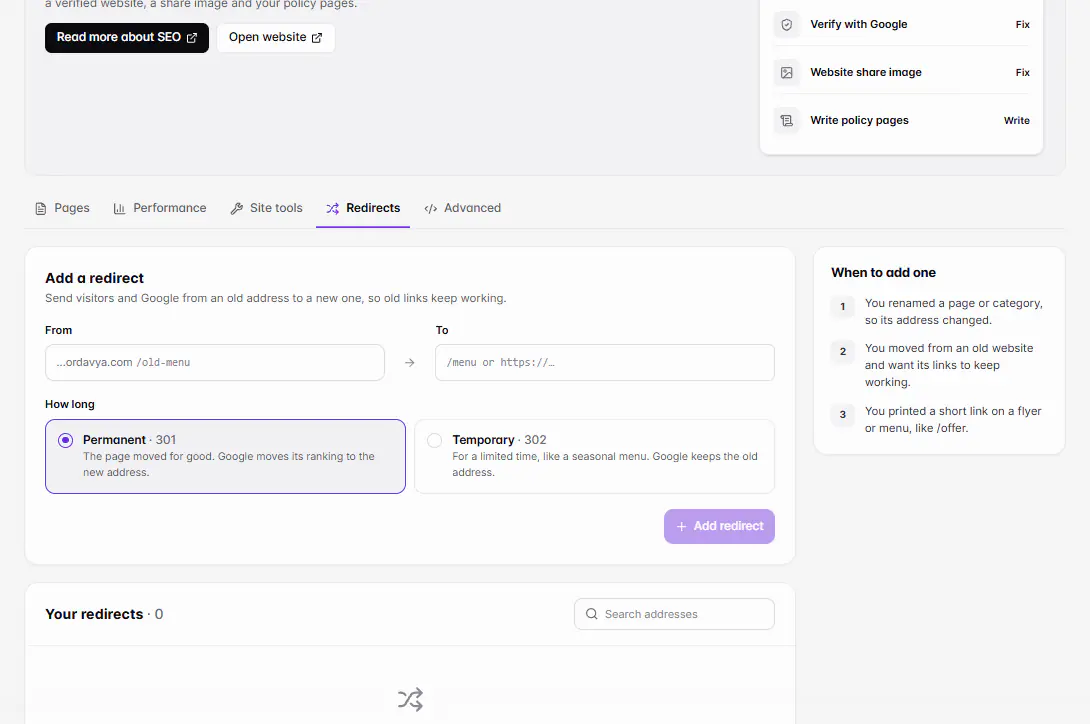
In Marketing › SEO › Redirects, choose Add redirect, enter the old address under From (like /old-menu) and where it should go under To, and pick Permanent or Temporary. It works on your website right away.
Updated 20 November 2026Where to find it
- Marketing
- SEO
- Redirects
- Control Center
- SEO
You need: A website project. The owner, or staff with SEO access. Up to 500 redirects per website.
A redirect sends visitors and Google from an old address to a new one, so old links keep working. You don't need one when you change a page's URL slug or your ordavya.com address: Ordavya forwards those by itself.
When to add one
- You moved from an old website and want its links to keep working.
- You printed a short link on a flyer or menu, like /offer.
- You renamed a page or category, so its address changed.
Add a redirect
- 1Open RedirectsGo to Marketing › SEO and choose the Redirects tab. In the Ordavya Admin app, go to Control Center › SEO and open Redirects.
- 2Choose Add redirectUnder From, enter the old address as a path on your website, like /old-menu.
- 3Enter where it goesUnder To, enter a page on your website (/menu) or a full link (https://…).
- 4Choose the type301 · Permanent: the page moved for good, and Google moves its ranking to the new address. 302 · Temporary: for a limited time, like a seasonal menu; Google keeps the old address.
- 5SaveYou see Redirect added. It works on your website now. Test it by opening the old address in a private window.
Find or remove redirects
Your redirects are listed under Your redirects. Use Search redirects to find one, and the remove button to delete it. A removed redirect stops working right away.
If something goes wrong
The messages you might see, and what to do.
The home page can't be redirected.
Choose another old address. To move visitors to a new website, change your domain instead.
An address can't redirect to itself.
Make To a different page from From.
There's already a redirect for that address.
Find it with Search redirects and remove it first, or keep the existing one.
The old address is a path on your website, like /old-menu (no spaces, ? or #).
Enter only the part after your domain, starting with /.
Send it to a page on your website (/menu) or a full link (https://…).
Start To with / for your own pages, or with https:// for another website.
A website can have up to 500 redirects.
Remove redirects you no longer need before adding more.